

Shopify Plus Experts
How we merged OWNKIND’s product catalogue into a single multi-variant product, built a custom Skio subscription widget with tiered free gifts, and made the gallery change with each variant. We launched it in the UAE, then on the US and UK stores.
OWNKIND sells hydration and wellness sachets in several flavours, pack sizes and bundles. As the range grew, the storefront got harder to shop. Each option was its own product with its own page and its own subscription setup. A shopper deciding between flavours, or between subscribing and buying once, had to move from page to page to compare them.
We fixed this in three parts. First we merged the catalogue into one product with multiple variants. Then we built a custom Skio subscription widget with tiered free gifts. Finally we connected everything to GemPages so the marketing team can keep building landing pages without a developer. We launched on ownkind.ae first, then rolled the same setup out to the US and UK stores.
Shoppers on a subscription brand’s product page are making one decision: which flavour, how often, and how much do I save? When those choices are spread across separate products:
OWNKIND needed one page that answers the whole question.
We combined the separate products into one Shopify product with multiple variants. Flavour and pack configuration became variant options instead of separate listings.
As a result:
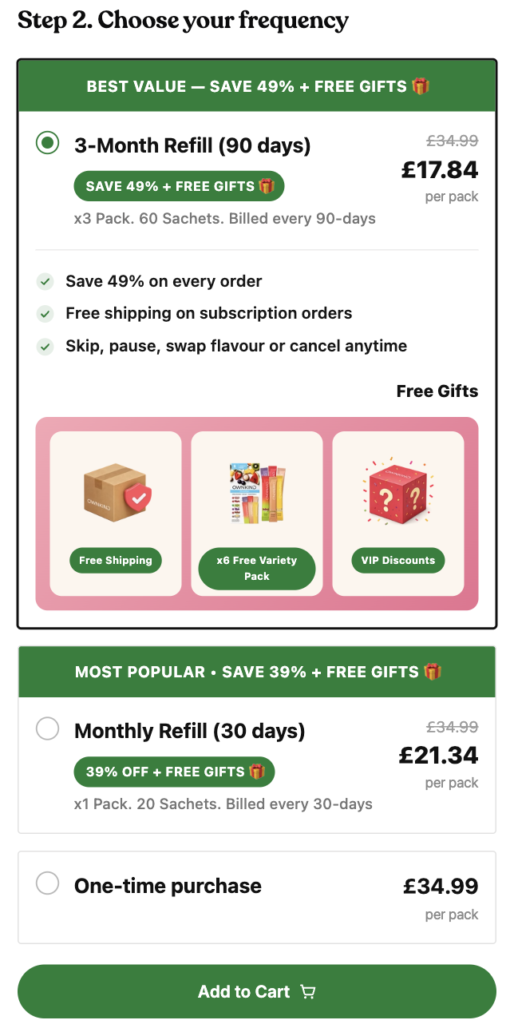
Skio’s default widget works, but OWNKIND wanted the purchase options to sell the subscription instead of just listing it. We built a custom widget with three clearly ranked tiers:
| Option | Billing | Pack | Offer |
|---|---|---|---|
| 3-Month Refill | Every 90 days | x3 Pack, 60 sachets | Best value: save 49% + free gifts |
| Monthly Refill | Every 30 days | x1 Pack, 20 sachets | Most popular: save 39% + free gifts |
| One-time purchase | Once | x1 Pack | Full price |
Clear hierarchy. Each subscription tier has a banner (“Best Value”, “Most Popular”) and a savings badge. The selected option gets a strong border, so shoppers always know what they’re about to buy.
Per-pack pricing. Showing a per-pack price next to the struck-through full price makes the 3-month saving obvious at a glance, even though that order costs more upfront.
Fewer objections. The selected subscription lists its benefits right where the shopper decides: savings on every order, free shipping on subscription orders, and the option to skip, pause, swap flavour or cancel anytime.
Prices that follow the variant. When a shopper changes flavour or pack, the widget recalculates every tier’s price, discount and billing text from the selected variant’s Skio selling plan.
The free gifts are the most noticeable part of the widget. When a subscription tier is selected, a “Free Gifts” panel shows what the shopper gets:
Showing the gifts as visual cards, not a line of small print, gives the shopper a concrete reason to pick a subscription over a one-time purchase. Because the gift panel is tied to the selected tier, it only appears for subscription options. The one-time option stays plain, so the difference is easy to see.
Shopify only links each variant to a single featured image. A one-product setup needs more than that: when a shopper picks a different flavour, the entire gallery should change to show that flavour’s packaging, lifestyle shots and details.
We solved this with metafields:
The merchandising team manages variant images in the Shopify admin. No code change is needed to add a flavour or reshoot a pack.
OWNKIND’s marketing team builds campaign and landing pages in GemPages. A custom widget only helps if it works on those pages too. We made the Skio widget and the metafield-driven gallery work inside GemPages layouts, so:
After launching on the UAE store, we brought the same setup to OWNKIND’s US and UK stores. Each region has its own currency, pricing and selling plans. Because the widget reads everything from variant and selling-plan data instead of hardcoded values, we only had to change regional settings. The UI and logic stayed the same.
All three stores now share:
Running a subscription brand on Shopify and Skio, and want a purchase flow that helps sell the subscription? Get in touch and we’ll look at what’s possible for your store.


